
Velo
Your browser, one command away.
A universal, keyboard-first command launcher overlay that brings your browser's tabs, history, bookmarks, downloads, and actions into one place.
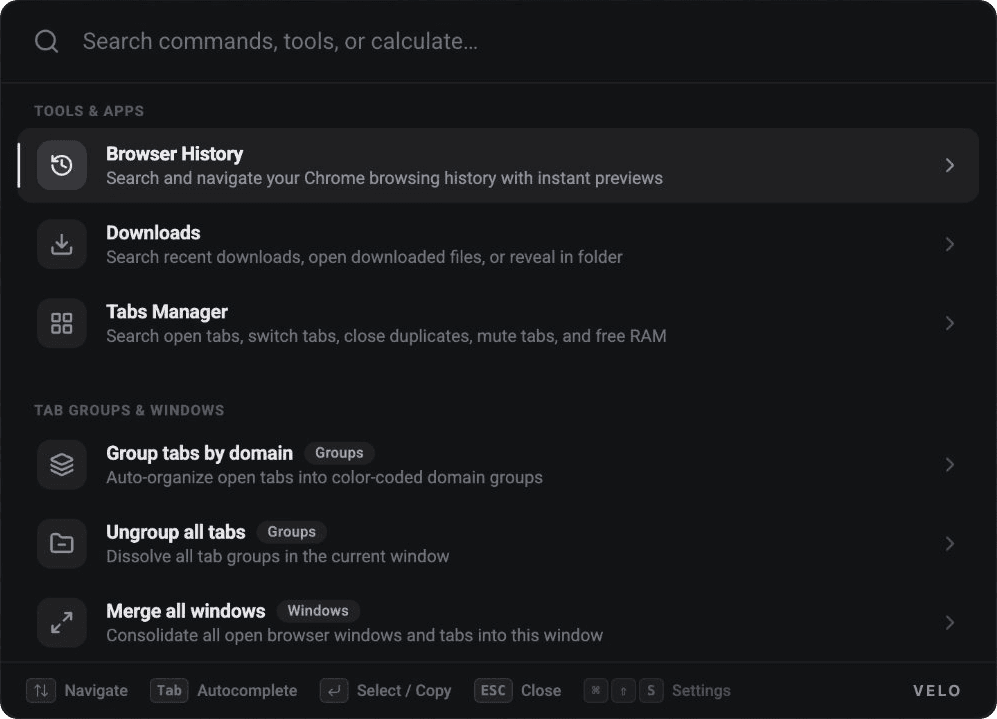
Why Velo?
Command launchers make a desktop feel connected: one place to find what you need and take action. Velo brings that idea into the browser.
The idea is simple: put your browser's tools and actions within reach of the keyboard, in one focused interface.
What Velo is being built around
Tabs Manager & Grouping
Search open tabs, switch instantly, close duplicates, mute tabs, free RAM, and auto-organize into color-coded domain groups.
Browser History with Previews
Search and navigate your Chrome browsing history with instant previews directly inside the palette.
Downloads Manager
Search recent downloads, open downloaded files, or reveal them in folder without leaving your page.
Calculator & Search Bangs
Calculate expressions on the fly and trigger custom search engine bangs (like !g, !yt) in one keystroke.
Keyboard-First Speed
Navigate with arrow keys, autocomplete with Tab, select with Enter, and configure custom shortcuts.
100% Local & Private
Built on an entirely local client-side architecture. Zero tracking, zero remote servers, and no telemetry.
Privacy First
Velo is built on a 100% local, client-side architecture. It interacts with your tabs, bookmarks, and browsing history solely on your machine to execute your commands in-memory. We do not collect, transmit, sell, or monetize your personal data, browsing habits, or keystrokes.
A closer look
Screenshots of Velo.


